How to organize Instagram downloads with folders and file names
By the Kipzo team · Updated October 23, 2026
After a few downloads, your Downloads folder turns into a wall of random file names. Kipzo lets you decide where each file goes and what it’s called — once, in settings, for every download after that.
Where to find the settings
Click the Kipzo icon in Chrome’s toolbar and open Settings. You’ll see two patterns:
- Save to folder — the folder inside Downloads. Default:
Kipzo/{username}(one folder per account). Leave it empty to save straight into Downloads. - File name — the name of each file. Default:
{username}_{id}_{index}.
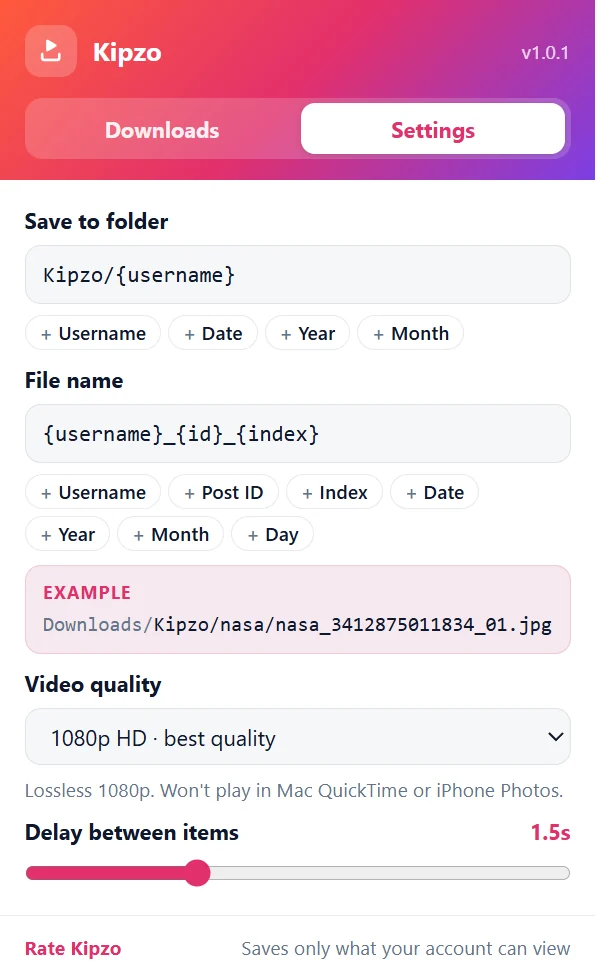 Kipzo’s settings, opened from the toolbar icon (default values shown).
You don’t have to type the {curly} parts: click the chips under each field — Username, Post ID, Index, Date, Year, Month, Day — and they’re inserted at the cursor. An Example line shows what a real file name will look like.
What each part means
| Chip | Inserts | Example |
|---|---|---|
| Username | {username} — the account’s name | nasa |
| Post ID | {id} — Instagram’s ID for the post | 3412875011834 |
| Index | {index} — slide number in a carousel | 01 |
| Date | {date} — publish date | 2026-10-01 |
| Year / Month / Day | {yyyy} / {mm} / {dd} — parts of the publish date | 2026 / 10 / 01 |
The folder field offers the chips that make sense for folders (Username, Date, Year, Month), but any of these work in either field.
Recipes
One folder per account (default)
- Folder:
Kipzo/{username} - Result:
Kipzo/nasa/nasa_3412875011834_01.jpg
By account, then year
- Folder:
Kipzo/{username}/{yyyy} - Result:
Kipzo/nasa/2026/nasa_3412875011834_01.jpg
By month, across all accounts
- Folder:
Instagram/{yyyy}-{mm} - Result:
Instagram/2026-10/nasa_3412875011834_01.jpg
Date first, so files sort by date
- File name:
{date}_{username}_{id}_{index} - Result:
2026-10-01_nasa_3412875011834_01.mp4
Tips
- Keep Post ID in the file name. It makes every name unique, so re-downloading a post replaces the old file instead of making copies — and carousel slides never clash.
- Highlights get their own folders automatically, under
Highlights/<highlight title>inside your folder. See downloading highlights. - Characters Windows doesn’t allow in names (like
:or?) are replaced automatically, so any account name works.
Ready to fill those folders? Start with downloading a whole profile.