Downloaded Instagram video won't play on Mac or iPhone? Here's why
By the Kipzo team · Updated October 23, 2026
You saved an Instagram video in HD, and it plays perfectly in Chrome — but on your Mac, QuickTime says it can’t open it, or it shows only sound. On an iPhone, Photos won’t import it. The file isn’t broken. It’s the video format.
Why it happens
Instagram’s sharpest (1080p) version of a video uses Google’s VP9 format. VP9 plays in:
- Chrome, Edge, Firefox and other browsers
- VLC (Mac, Windows, Linux, phones)
- Windows 10/11 and Android
But not in Apple’s QuickTime Player, the iPhone/iPad Photos app, Keynote or older versions of iMovie and Final Cut. Those expect H.264 (or HEVC).
You get a VP9 file when you save Instagram’s 1080p stream as it is — which is what Kipzo’s default 1080p HD · best quality setting does, because it’s lossless. (Instagram’s 720p file is H.264, which is why 720p downloads play everywhere. More in why Instagram downloads are 720p.)
Fix 1: let Kipzo convert while it downloads (easiest)
- Click the Kipzo icon in Chrome’s toolbar → Settings.
- Under Video quality, choose 1080p HD · plays everywhere.
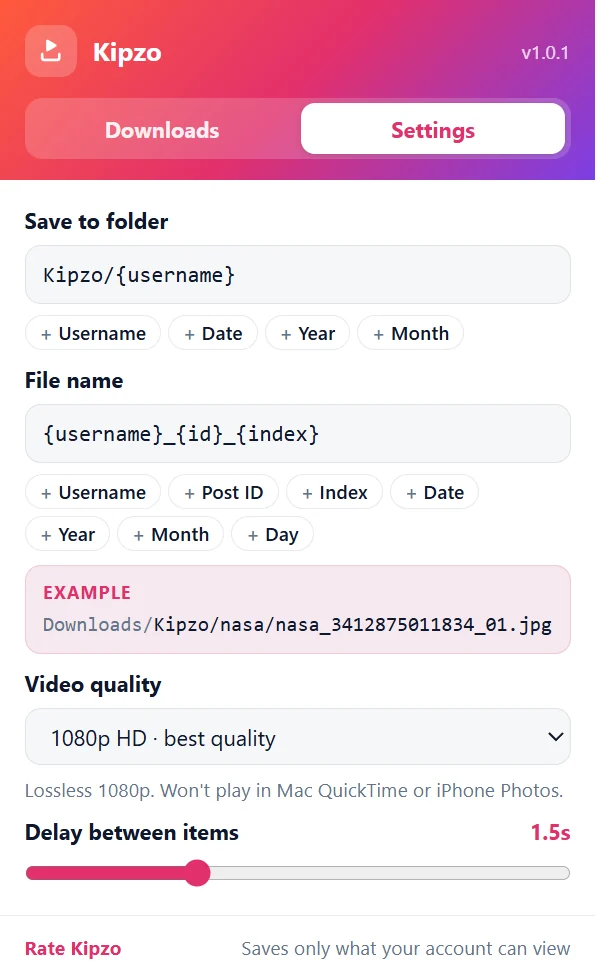 Kipzo’s settings, opened from the toolbar icon (default values shown).
From now on Kipzo converts each video to H.264 on your computer before saving it. You keep 1080p, and the file opens in QuickTime, Photos, iMovie and everything else. Each video takes a bit longer to save, since your computer does the conversion.
Fix 2: use a player that supports VP9
If you just want to watch the files on a Mac, install VLC or IINA. Both play VP9 MP4 files without any conversion.
Fix 3: convert files you already saved
For videos you downloaded before changing the setting, convert them once:
- HandBrake (free, Mac/Windows): open the file, choose the “Fast 1080p30” preset, and start the encode.
- ffmpeg (command line):
ffmpeg -i input.mp4 -c:v libx264 -crf 18 -preset slow -c:a copy output.mp4This re-encodes the picture to H.264 and copies the sound as it is.
Which setting should you use?
| You mostly use… | Choose |
|---|---|
| Windows, Android, VLC, Premiere/DaVinci | 1080p HD · best quality |
| Mac, iPhone, iMovie, Keynote | 1080p HD · plays everywhere |
| A slow computer, or speed matters most | 720p · fastest |